
Yours to Keep
Your record depends on no one else. There's nothing for anyone else to install, approve or join.
Private by design
The late pickup. The receipt you're still owed for. The message you know you'll need again. Write it down once, keep the proof beside it, and set it down for the night.
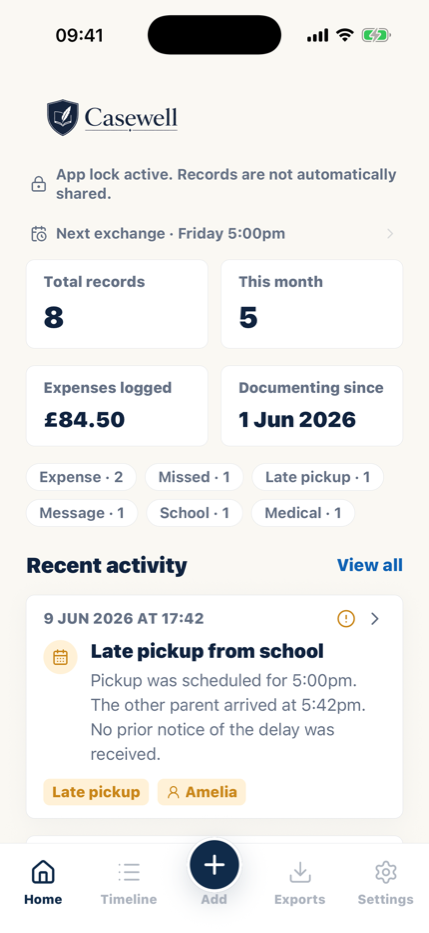
Your record depends on no one else. There's nothing for anyone else to install, approve or join.
The screenshot, the receipt, the photo. Each one stays with the day it belongs to.
When an adviser or mediator asks what happened, you hand them a clear PDF. You don't have to scroll back through months.
A different kind of co-parenting app
Messaging platforms work when both parents take part. Casewell is where you keep your own account of what happened. It stays complete, factual and easy to find.
Important: If a court order or parenting plan requires a specific communication platform, keep using it as directed. Casewell can sit alongside it as your private documentation layer.
Casewell
Shared platforms
What you can document
Write it down while it's fresh. Keep the proof beside it, so you're never hunting through photos and message threads at midnight.
Planned and actual times, delays, missed exchanges, locations and outcomes.
Explore handover logsScheduled care, changes, overnights and the time that actually took place.
Explore parenting timeChild-related requests, responses, decisions and relevant message context.
Build a communication logCosts, receipts, repayment requests, amounts paid and what remains outstanding.
Explore expense trackingWhat happened, when and where, who was present and the immediate outcome.
Use the incident templateVerbal agreements, screenshots, photos, documents and other supporting files.
Document verbal agreements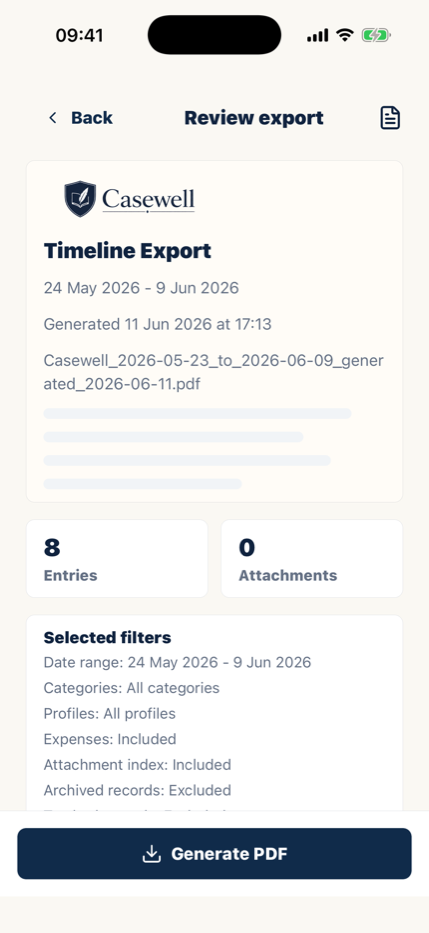
How co-parenting documentation works
Add the date, time, location, people involved, what was agreed and the outcome. Short, specific entries are easier to review.
Attach the relevant screenshot, receipt, photo, voice note or document to preserve context.
Filter the timeline and create a PDF with only the records you need, for your lawyer, your mediator, or your own peace of mind.
Practical guidance
A practical method for deciding what to record and how to keep it factual.
Evidence guideUnderstand source material, context and how organized records fit together.
Message guidePreserve complete conversations and connect them to the relevant event.
Free toolGet a private, browser-based checklist based on the situation you select.
Common questions
Casewell helps you organize information. It does not decide what is legally relevant or replace advice from a qualified professional.
No. Casewell is a private co-parenting documentation app for your own records. Your co-parent does not need an account and cannot approve, edit or delay your entries.
Useful records usually include dates, times, locations, what happened, what was agreed, the outcome and any relevant message, receipt, photo or document. Keep entries specific, factual and focused on the child.
Yes. You can keep supporting files with the event they relate to, so the context is easier to find and review later.
Yes. Casewell can create organized PDF reports from the records you select, including dates, notes, categories, expenses and attachments.
No. Casewell is a documentation tool, not a law firm. A court or qualified professional decides what is relevant or accepted in a particular matter.
Private. Factual. Organized.
Start a private co-parenting journal. Every entry becomes part of a clear PDF when you need it.

14-day free trial · iPhone & iPad · Cancel anytime