

The call was supposed to end at 7:15. It's 7:24, your child is yawning in the other parent's lap, and you're watching the clock while deciding whether to say something or just press Leave. That last moment can become a clipped goodbye, a disagreement about the next exchange, or a calm record that both parents understood what happened.
In co-parenting, a video call isn't just a conversation. It can be a witnessed transfer of responsibility, especially when distance, illness, travel, or a parenting plan makes an in-person exchange impractical. The final thirty seconds shape the emotional tone and determine whether your notes later show a clear, neutral sequence of events. Parents managing a high-conflict relationship can use the practical guidance in high-conflict co-parenting to keep those moments structured rather than reactive.
Why the Way You End a Video Call Matters
A rushed ending creates uncertainty. Did the call finish at the scheduled time? Had both parents confirmed where the child was? Was the child settled, or did someone disconnect during a disagreement? When the answers remain unclear, each parent fills the gap with an interpretation. That's how a small closing problem becomes the subject of the next message, handoff, or court discussion.
A clean ending does two jobs at once. It shows basic respect to the other parent, and it creates a neutral, chronological record. Those goals support each other. A calm spoken closing makes it less likely that someone will feel cut off, while a precise final statement gives you something factual to record afterward.
Practical rule: Don't treat the end button as the end of the exchange. Treat the spoken confirmation before it as part of the exchange.
Use a simple sequence:
- Notice the time. Give enough warning for both parents to finish the current topic without rushing the child.
- Confirm the child's status. State whether the child is comfortable, tired, unwell, or ready to transition.
- Restate the next practical detail. Name the next pickup, drop-off, call, or item that needs attention.
- Close neutrally. Thank the other parent, say goodbye, pause, and then press the correct button.
The other parent may still respond badly. You can't control their reaction, but you can control whether your words, timing, and notes remain measured. In a tense co-parenting relationship, that discipline protects the next exchange from being built on an avoidable misunderstanding.
Ending a Call on Zoom, Teams, FaceTime, and Google Meet
The button differs by platform, but the principle stays the same: choose whether you're leaving only for yourself or ending the meeting for everyone. Check the screen before clicking, especially if the child is still speaking or another participant is documenting the exchange.
| Platform | Button to End for You | Option to End for All | Recording Behavior on End | Transcript Retention |
|---|---|---|---|---|
| Zoom | Leave Meeting | End Meeting for All for the host | A recording may stop or process when the host ends the meeting. Check the recording status first. | Chat and other records can depend on meeting settings, host controls, and organizational retention. |
| Microsoft Teams | Red Hang up or Leave | The organizer can use End meeting | An active recording can stop when the meeting ends. Confirm that the recording has finished processing before closing the app. | Meeting chat, transcript, and notes can follow the meeting's storage and retention settings. |
| FaceTime | Red End button | There's no separate host control in an ordinary call | FaceTime doesn't provide the same meeting-host recording workflow as Zoom or Teams. Any recording requires a separate device feature and lawful consent. | Messages and call history are separate from a meeting transcript. Don't assume a transcript exists. |
| Google Meet | Red phone icon, then Leave call | The host can choose End call for all | A recording in progress may stop when the host ends the call. Verify where the recording is stored. | In-call notes and transcripts depend on the meeting's enabled features and account settings. |
Before you click, check three common mistakes:
- Muting instead of leaving: The call continues, even though you can't hear the other parent.
- Remaining in a waiting room: You may think the call ended while the other person still sees you waiting.
- Losing supporting records: Host actions can affect chat, notes, transcripts, and recordings, so save permitted evidence according to your parenting plan and local law.
Menu names and layouts can change after an app update. The right button matters, but the words spoken before you click it matter more.
The Verbal Closing Sequence That Prevents Conflict
Abruptly disconnecting is rarely neutral. It can look like punishment, avoidance, or an attempt to prevent the other parent from finishing a sentence. Guidance on phone and video-call etiquette consistently favors announcing the close, thanking the other participant, and allowing the goodbye exchange to finish.
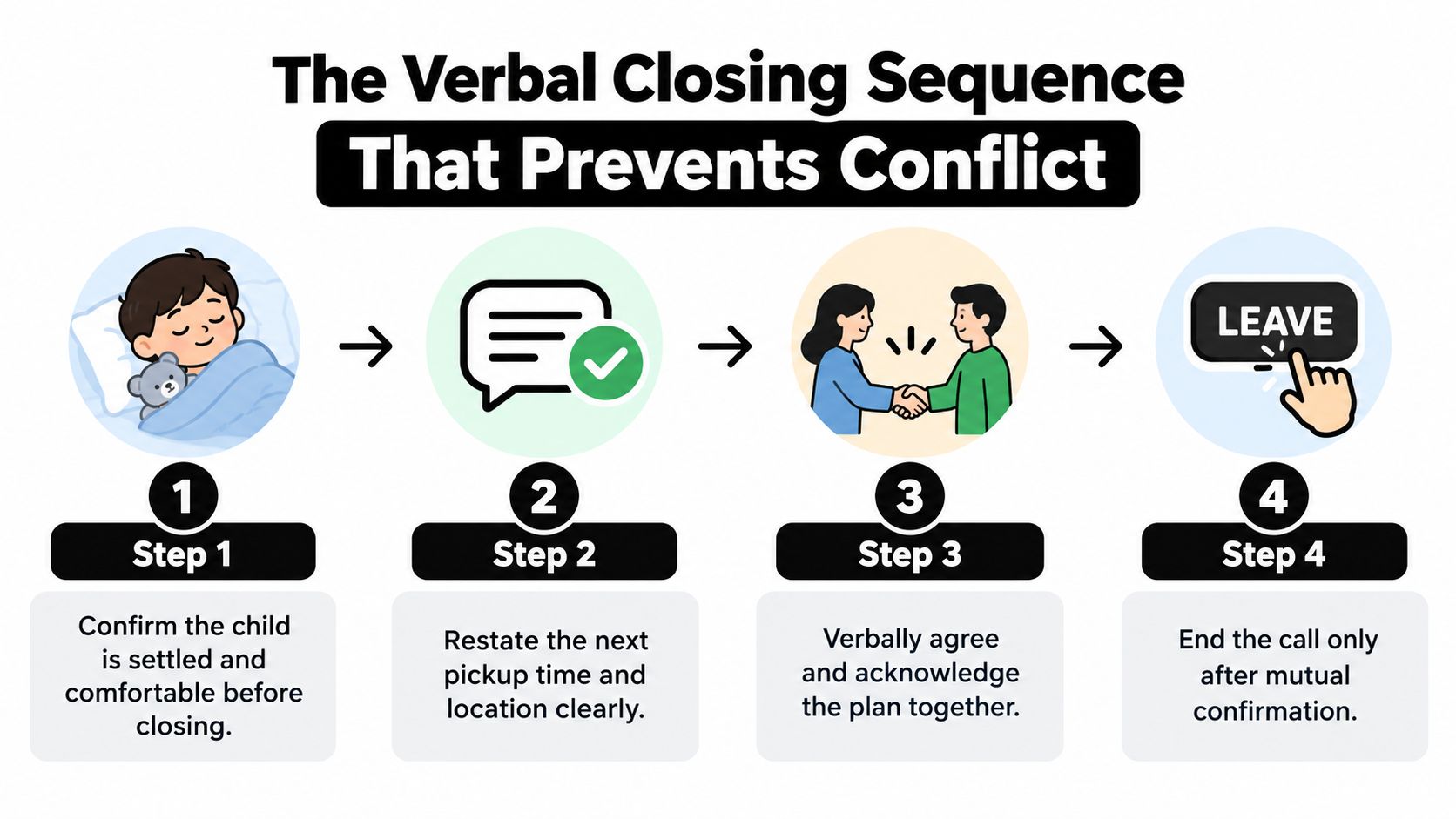
Use four steps:
- Confirm the child is settled. “Jamie has finished the call and is comfortable.”
- Restate the next plan. “The next pickup is Thursday at six at the usual location.”
- Resolve one practical uncertainty. “Can you confirm you'll bring the backpack?”
- Give a neutral sign-off. “Thanks, take care. Talk Thursday at six.”
Pause briefly after the goodbye. One independent recommendation suggests a two-second pause before ending to reduce awkward cutoffs, while the broader etiquette guidance supports waiting until the farewell exchange is complete. If the call is lawfully recorded, that pause also helps preserve a clear audible ending. Don't sigh, roll your eyes, look away theatrically, or add sarcasm. Those gestures can communicate more hostility than the words themselves.
If the exchange involves an agreement, record it in neutral language rather than relying on memory. A structured guide to documenting verbal agreements can help you separate what was said from what you think the other parent meant.
Running a Co-Parent Handoff on Video
Run the call as the exchange window, not as an informal conversation around the exchange. Join five minutes before the scheduled handoff from a quiet space, keep the camera on, and make the transfer visible to both parents.
The receiving parent should confirm the child's location and visible condition. The sending parent should identify practical items that travel with the child, such as a backpack, medication, or sports gear. Keep the update short and factual:
- The child's meal or nap status
- Current mood and energy
- Homework or immediate school needs
- Medication or care information
- Items included in the transfer
The receiving parent then acknowledges the handoff aloud. A useful format is: “Confirming Jamie is with me as of 18:02.” Both parents should repeat or acknowledge the same fact before either person ends the call. Avoid off-record commentary, muting to whisper, or letting another adult answer on a parent's behalf. If the child speaks, let the child speak for themselves.
If the other parent is late, remain on camera without turning the delay into an argument. The visible call history and your later factual note can show that you joined and remained available. Don't fill the waiting time with accusations or messages sent through the child.
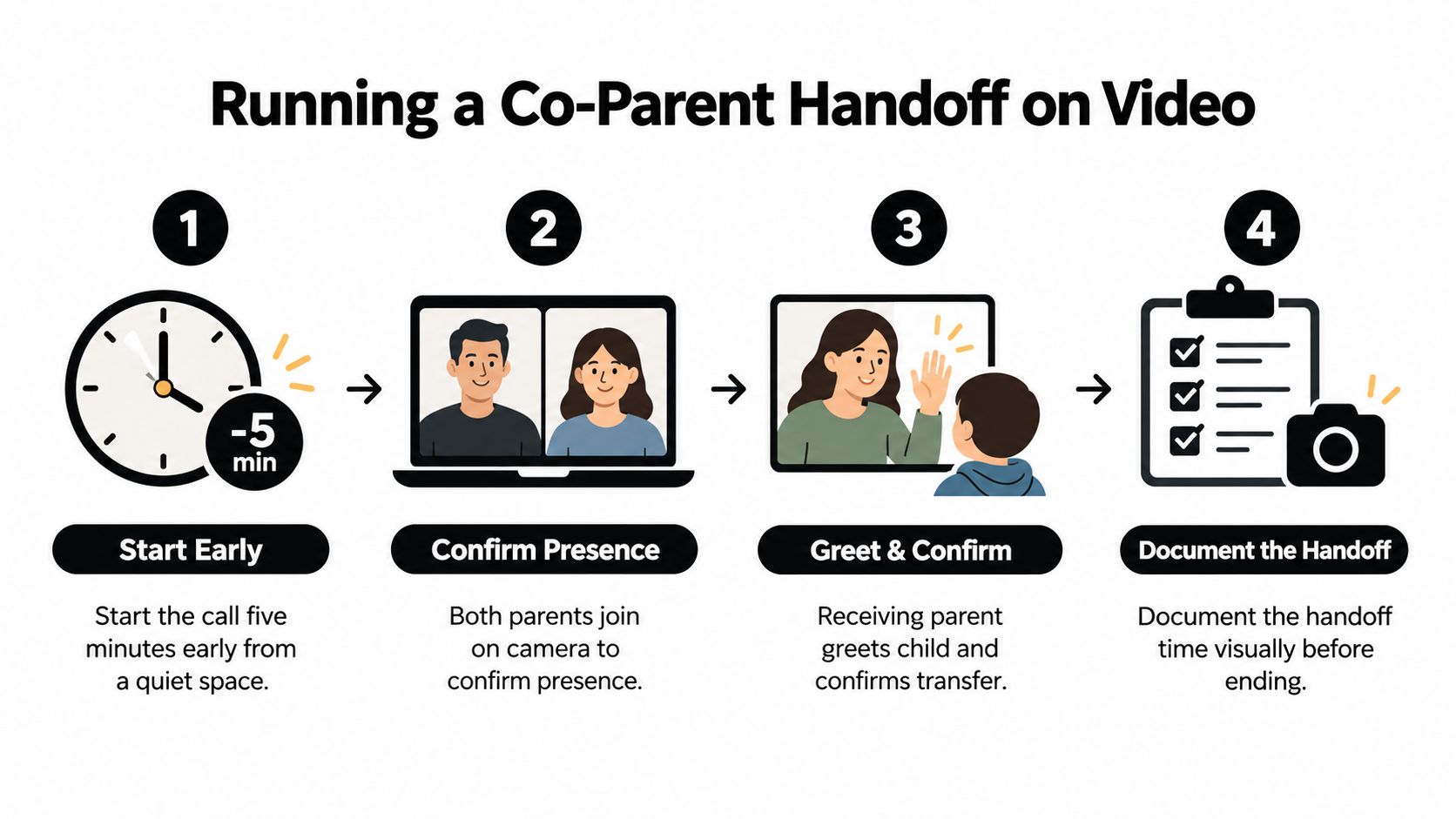
Use an exchange log template if you need consistent prompts for times, participants, items, and deviations. Consistency matters because it prevents the stressful call from determining which details you remember later.
What to Record the Moment the Call Ends
On a tense Friday exchange, the temptation is to close the laptop and decompress. That's exactly when details begin to blur. Write the entry while the call is still fresh, but keep the language suitable for someone who wasn't present.
Record the exact start and end times, not rounded estimates. Note the planned handoff time, the actual confirmation time, the length of any delay, and which parent caused or requested the change. Don't label the delay “unreasonable” or “disrespectful.” State what occurred.
A useful private entry might read:
“Video call began at 18:00 and ended at 18:08. At 18:06, Parent A stated that Jamie was with Parent B. Parent B acknowledged the transfer. Jamie appeared seated on a sofa, wearing a blue sweatshirt, and appeared tired. Backpack and medication were visible. No other person spoke during the call.”
That entry records observable facts without arguing about motive. It also preserves the sequence, which is more useful than a general note saying the exchange “went badly.”
Save permitted supporting material promptly:
- Call details: Platform name, duration, and participant record
- Visual proof: A screenshot showing the call information or participant tiles
- Recording file: A dated filename if recording was lawful and consent requirements were met
- Participant context: Who was present and who spoke
- Child details: Visible clothing, energy, symptoms, marks, or emotional cues
Recording laws vary by location and circumstance. Before recording a co-parenting call, review the applicable consent rules and any court order. Guidance on recording co-parenting interactions can help you think through the documentation issue without treating a recording as automatically lawful or automatically necessary.
Building a Court-Ready Exchange Check-In Entry
A court-ready entry should resemble a timestamped incident report, not a diary. The reader should be able to identify the child, the planned event, the actual event, and the attached proof without asking you to explain the missing context.
Use 24-hour time, include the timezone, and write in the third person. Present tense keeps the wording direct. Avoid adjectives about the other parent's tone, character, or intentions. “Parent A raises their voice” describes an observable action more clearly than “Parent A is aggressive,” but include only details that are relevant and supportable.
| Field | Example | Source |
|---|---|---|
| Exchange date and exact times | 2026-09-18, 18:00 to 18:08, local timezone | Platform call log |
| Platform and duration | Zoom, duration shown in meeting details | Zoom meeting record |
| Parents | Full legal names of both parents | Parenting documentation |
| Child | Full name and age | Parenting documentation |
| Planned handoff | Scheduled time and location | Parenting plan |
| Actual handoff | Time both parents confirm the transfer | Spoken confirmation and call record |
| Factual summary | “Parent B confirms Jamie is with Parent B at 18:06.” | Call notes or recording |
| Deviation | Late start requested by Parent A | Message, call record, or spoken statement |
| Attached proof | Screenshot filename or saved video filename | Evidence attachment |
A strong entry distinguishes the planned event from the completed event. If the plan required a call at one time but the child was confirmed later, record both. If someone requested a change, name that person without adding blame. If no deviation occurred, say so plainly.
Keep proof beside the entry rather than scattered across a camera roll, email account, and downloads folder. A private custody journal application such as Casewell can organize dated factual records, exchange check-ins, attachments, agreements, and PDF exports while keeping the record under the user's control. Re-read the entry once before saving and ask whether a judge, mediator, or attorney could follow the sequence without knowing the history between the parents.
A Reusable Closing Checklist for Every Exchange
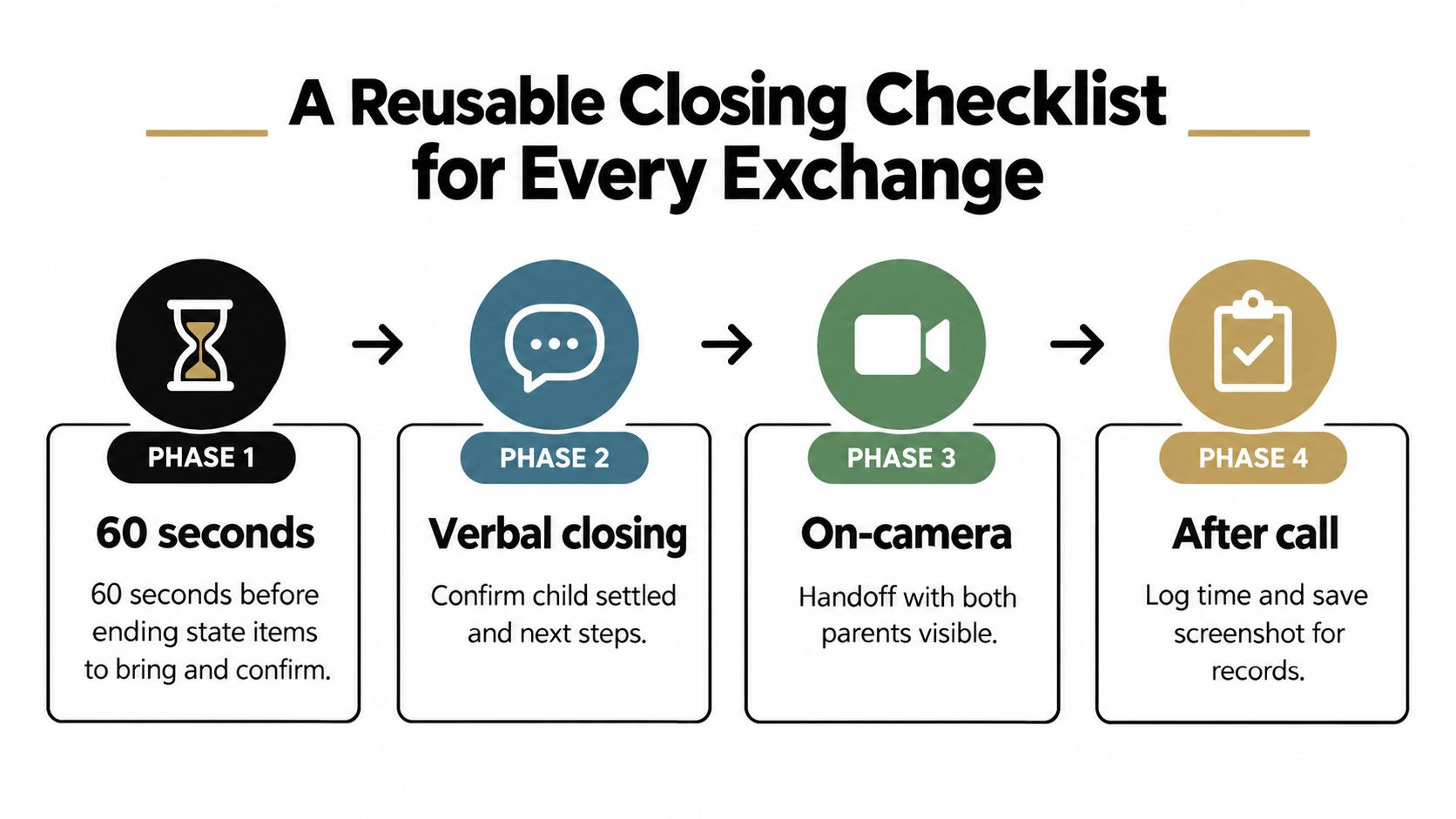
Save this checklist where you can see it during the call. It compresses etiquette, platform mechanics, and documentation into one repeated routine.
Sixty seconds before ending
- Confirm the child: Make sure the child is settled and visible.
- Check the items: Name medication, bags, schoolwork, or equipment.
- State the next time: Say the next exchange or call time aloud.
- Resolve one issue: Ask one short practical question while both parents are present.
Closing script
- Summarize the transfer: State who has the child and when.
- Invite acknowledgment: Wait for the other parent to confirm.
- Thank and sign off: Use a neutral goodbye without sarcasm.
- Pause briefly: Let the farewell finish before touching the screen.
Platform exit
- Choose the correct control: Use Leave for yourself or End for all only when appropriate.
- Check the recording: Confirm that any lawful recording has stopped or saved.
- Avoid accidental mute: Verify that you aren't merely silencing the call.
- Confirm departure: Make sure you're no longer in the meeting or waiting room.
Post-call log
- Capture exact times: Record start, end, planned, and actual handoff times.
- Save proof: Attach the call log, screenshot, or lawful recording filename.
- Describe facts: Note the child's visible condition and who participated.
- Review before saving: Remove opinions, sarcasm, and unsupported conclusions.
A standardized closure sequence can make the process measurable. One independent benchmark describes an average 4.2-second path from realizing the call is ending to clicking leave, and proposes tracking exit latency, residue duration, and overflow rate, with targets of 1.8 seconds or less, 12 seconds or less, and 5% or less, respectively, for teams evaluating Zoom or Teams workflows. See the benchmark on ending video calls for that framework, then adapt the idea to your own exchange records.
Casewell offers private custody journaling, structured exchange check-ins, evidence attachments, and focused PDF exports for professional review. Use Casewell to turn your next video handoff into a dated, factual record, then start the closing sequence before you press Leave.