 Casewell
A custody PDF export is only as good as the records behind it. The strongest ones are dated, organized by category, tied to their source messages and receipts, and short enough for a judge or attorney to scan. We built Casewell so you log exchanges, messages and expenses in one private place and then export a clear, filterable PDF from them, instead of rebuilding a timeline from screenshots the night before a hearing.
TL;DR
- Log events the same day, with dates, facts and who was present. A PDF built from consistent entries reads as credible.
- Organize by date and category, and keep every original message, receipt and file untouched next to the export.
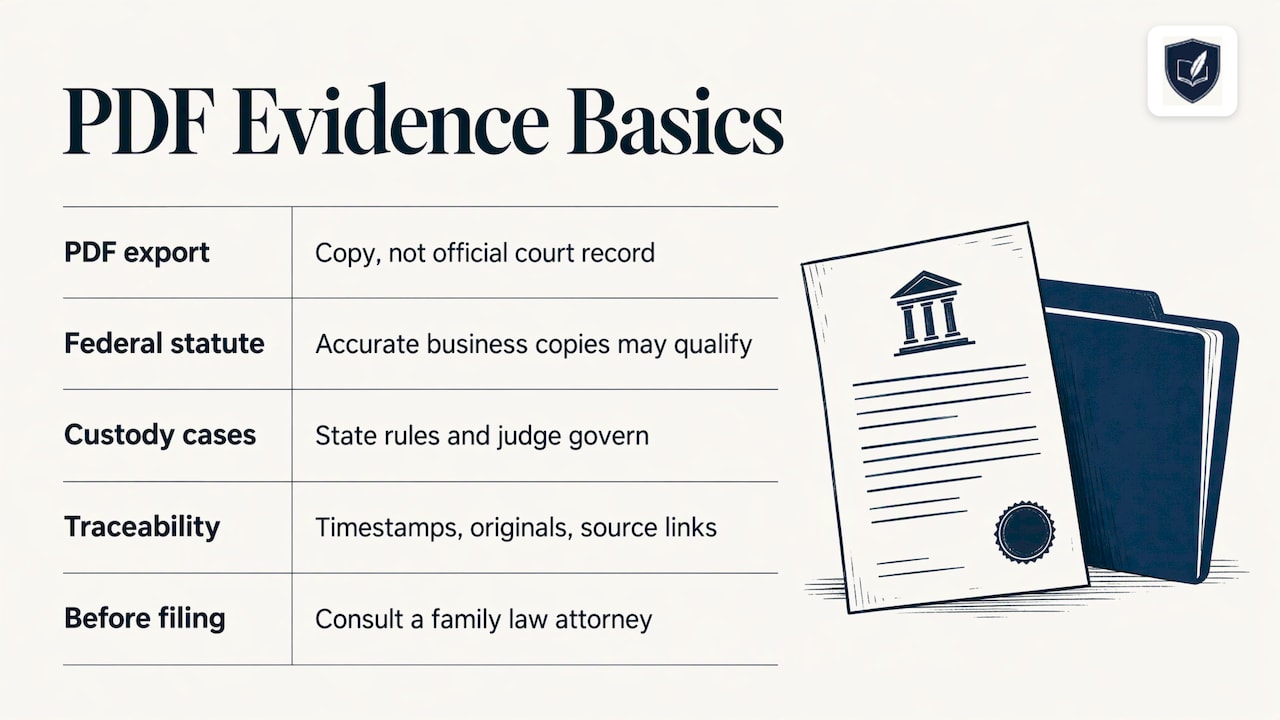
- A PDF is a copy, not an official court record. Whether it comes in as evidence is up to the court in your state.
- If any record is in another language, many courts want a certified English translation before the hearing.
- Casewell exports court-ready, indexed PDFs from your journal, with records encrypted on your device.
Table of Contents
- What a useful custody PDF contains
- Record events so the PDF reads as credible
- Keep originals intact when you export
- Does a PDF count as evidence?
- When records or orders are in another language
- When the other parent will not cooperate
- Start your export-ready journal
- FAQ
- Sources
What a useful custody PDF contains
Judges and attorneys rarely read everything. One practitioner checklist puts it bluntly: a judge will not read 800 pages of unsorted records. Organization is part of the documentation.
A custody file can include current orders and agreements, a brief timeline of significant events, relevant messages and lawfully obtained records, and receipts for disputed child-related expenses. For school, health and activities, keep attendance, appointment, care-instruction and activity records, obtained and used lawfully. Our guides cover the details for medical records and school records.
A practical export has these parts:
- A one-page chronology. Each row has a date, a neutral description, the source file and, if relevant, the order provision involved. A Utah firm describes this as an index, and notes that it does not replace the source records.
- Category sections. Parenting time and exchanges, communications, expenses, health and school, and agreement or order compliance.
- Supporting records. Receipts, message threads and appointment confirmations, referenced by the entries they support.
Casewell’s court-ready reports are built to be filterable and indexed, so you can pull one issue, such as late pickups over three months, rather than printing your whole history.
Record events so the PDF reads as credible
The PDF can only repeat what you wrote. Habits that make entries useful later:
- Write the same day and date every entry. Record facts: what happened and who saw it. Mark details you reconstructed as approximate, as one Missouri law firm’s evidence packet advises.
- For exchanges, note the scheduled time, what actually happened, and any cancellation and its stated reason.
- Include the smooth exchanges and your own late arrivals. The same packet says a balanced record is more credible than one that lists only the other parent’s faults.
- Think pattern, not scorecard. A Utah attorney frames documentation as a way to show a repeated, child-centered pattern rather than an isolated disagreement, not as a guarantee of any result.
This is where heated entries cause trouble. Casewell includes optional AI-assisted rewriting that turns an entry into neutral language, and you approve every change. Prompts after each exchange or handover help you log while it is fresh. You can see how these work on the features page and in the parenting time log.
Keep originals intact when you export
The rule that matters most: preserve before you change anything. Organize records by date and category, identify each entry’s source file, keep related records together, and preserve originals before highlighting, printing, renaming or adding notes.
For messages, keep complete threads with senders, recipients, timestamps, attachments and the surrounding messages. A dated log of important communications works alongside the originals, never as a rewritten summary presented as the original.
A simple routine:
- Save the original thread or file in a folder by type and year.
- Add an entry to your journal that points to it.
- Once a month, export a dated PDF and store it with the originals.
- Before a hearing, filter the export to the issues in dispute.
The working method is laid out in our guide on organizing custody evidence, and the custody evidence checklist helps you see what is still missing.
Passports, travel and other documents
Travel often generates paperwork that belongs in the file: consent forms, itineraries, and proof of what each parent agreed to. If a child’s passport is in play, this overview of child passport options after divorce explains the process, and the resulting documents can be logged and exported alongside your other records.
Does a PDF count as evidence?
Not automatically. A PDF export is a copy of your records, not an official court record. Federal law does support admitting accurate reproductions: under 28 U.S.C. §1732, a record kept in the regular course of business and reproduced by an accurate process is, when properly identified, as admissible as the original. That statute addresses business records, though, and custody cases are decided under state rules, so what a judge accepts, and how, depends on your state and your judge.
What helps in practice is the same everywhere: timestamps, consistency, preserved originals and a clear link between each entry and its source. One writer on parallel-parenting documentation calls the difference recollection versus traceability: your account may be sincere, but a traceable record lets everyone examine the same sequence.
Before you file anything, talk with a family law attorney licensed in your state about how your records should be presented.
When records or orders are in another language
If you or the other parent have records in a language other than English, expect the court to want an English version. Rules differ by court:
- In California Superior Court, Rule 3.1110(g) requires foreign-language exhibits to come with an English translation certified under oath by a qualified interpreter. The declaration identifies the translator, the language pair and the document. A family member should not translate disputed evidence.
- Riverside County’s local rule 1.1025D says documents in another language used in a proceeding should be translated before the hearing.
- To register a foreign custody order in Union County, Ohio, the filing checklist asks for certified translations plus sworn translator affidavits.
Casewell supports multiple languages, so you can keep your journal in the language you think in. Check your court’s local rules or clerk’s office early about translation of the exported report, since certification requirements are set by the court.
When the other parent will not cooperate
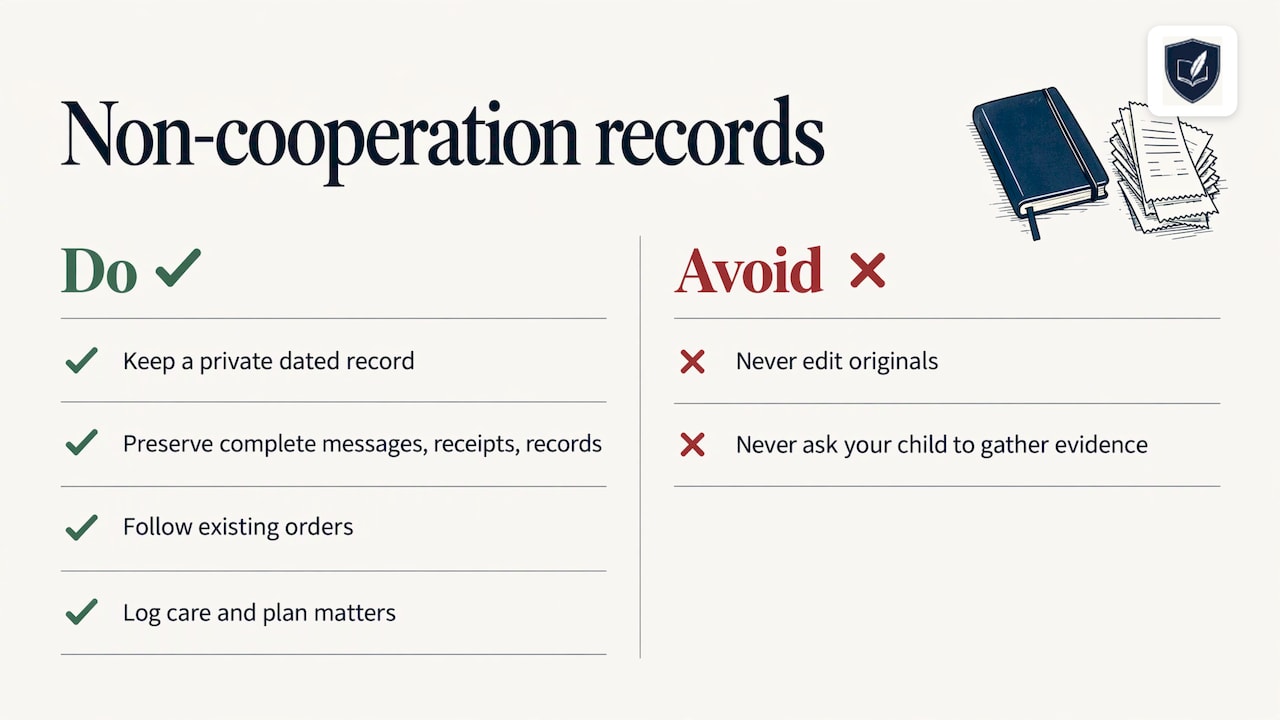
With a non-cooperative co-parent, your records carry more weight, because you cannot count on agreed accounts. Keep a private dated record and preserve your own complete messages, receipts and lawfully obtained records. Follow existing orders, never edit originals, and never ask your child to gather evidence. Keep documentation proportionate: log what bears on the child’s care and your parenting plan.
Privacy matters here. Casewell stores records encrypted on your device and does not keep copies on company servers, so your journal stays yours until you choose to export.
Our view
A custody PDF should be the last step of a habit, not an emergency project. Parents who log briefly after each handover end up with a history that is dated, consistent and calm in tone. That is what a reviewer can follow without reconstructing anything.
We built Casewell around that idea: one private place for exchanges, messages, expenses and agreements, optional neutral rewording that you approve, and exports that are indexed and filterable so the reader sees the pattern and not a pile.
The export is the visible part. The value is the months of clean entries behind it.
Mielad
Start your export-ready journal
Casewell Premium costs $2.99 per week or $49.99 per year, with a free trial period first, and it covers the journal, timeline tracking and court-ready PDF exports. If you want a structured chronology prepared for a case, our court timeline service starts from £29 one-off. You can begin on the Casewell site.

FAQ
Can I export my custody records as a PDF?
Yes. In Casewell you can filter your journal by date range or category and export a dated, indexed PDF. Keep the original messages and receipts alongside it, since the PDF is a copy.
Is a PDF export accepted by the court?
A PDF is not an official court record, and admissibility is decided by the judge under your state’s rules. Records that are dated, consistent and traceable to preserved originals are easier to present. Ask a family law attorney in your state how to submit them.
How often should I export?
A monthly dated export, stored with your originals, gives you a running archive. Before a hearing, create a focused export limited to the issues in dispute.
What if my records are not in English?
Many courts require a certified English translation of foreign-language exhibits, often before the hearing. Requirements vary by court, so check the local rules or ask the clerk early.
Sources
- Documentation Checklist for High-Conflict Custody Cases
- How to Navigate a Custody Battle With a High-Conflict Co-Parent
- Child Custody Evidence Checklist for Indiana Parents
- Documenting Utah Custody Concerns Calmly
- Custody Evidence Record: Incident, Exchange, and Expense
- Parallel Parenting Logs: Using Documentation for Court
- 28 U.S.C. Chapter 115, Evidence; Documentary
- California Rule 3.1110(g): Foreign-Language Document Translation
- Riverside County Superior Court Local Rules
- Union County Ohio Checklist: Registration of Foreign Custody or Support Order